Data Retention Policies in Microsoft 365 Explained
In today’s corporate environments, robust data lifecycle management is no longer just a compliance checkpoint; it is a fundamental pillar of modern cybersecurity strategy. As organizations integrate advanced architectures like Zero Trust and deploy Artificial Intelligence tools across their environments, the volume and velocity of generated data present significant risk.
A mature Microsoft 365 (M365) retention strategy ensures that large and emerging corporations preserve critical business records for regulatory compliance, while systematically purging obsolete data to minimize the blast radius in the event of a security breach.
The Architecture of M365 Data Lifecycle Management
Microsoft Purview governs data lifecycle management through two primary mechanisms. While they share the same admin center, they serve distinctly different structural purposes. Understanding this distinction is the cornerstone of effective IT governance.
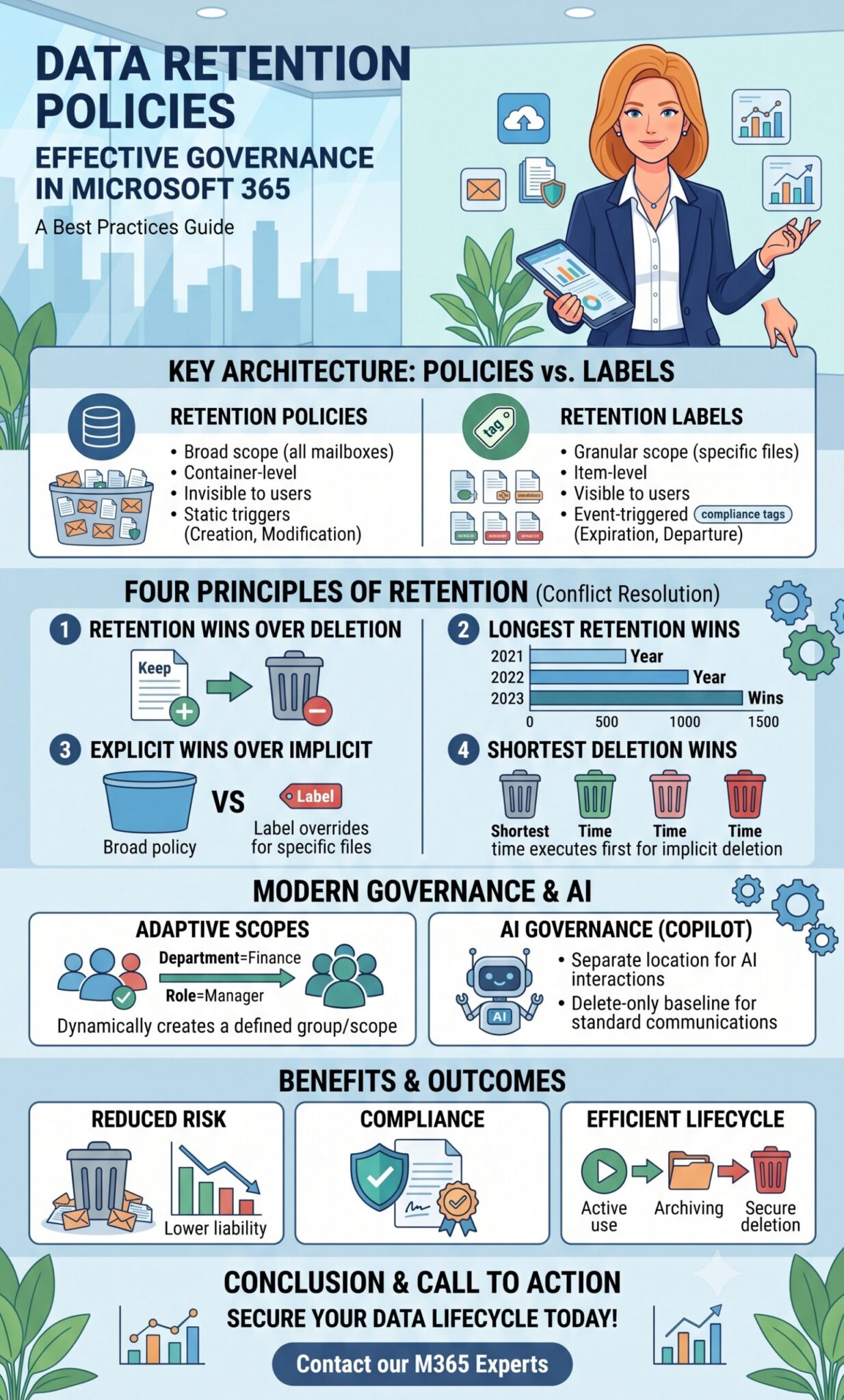
Retention Policies vs. Retention Labels
| Feature | Retention Policies (The Container) | Retention Labels (The Item) |
| Scope | Broad. Applies to entire locations (e.g., all Exchange mailboxes). | Granular. Applies to specific files, emails, or folders. |
| Visibility | Invisible to end-users. Runs silently in the background. | Visible. Can be manually applied by users or auto-applied via conditions. |
| Flexibility | Static. Enforces blanket rules across the container. | Highly flexible. Can declare items as immutable regulatory records. |
| Mobility | Bound to the location. If a file moves out of the site, the policy drops. | Travels with the item anywhere within the M365 tenant. |
| Trigger | Based on creation or last modified date. | Can be triggered by events (e.g., contract expiration, employee departure). |
Strategic Note: Managed IT service providers highly recommend using both constructs in tandem. Think of Retention Policies as the baseline “floor” that catches everything, and Retention Labels as the “ceiling” for specialized, high-value data requiring granular exceptions.
The Four Principles of Retention (Conflict Resolution)
Because an item in M365 can be subject to both a container-level Policy and an item-level Label simultaneously, conflicts are inevitable. Microsoft resolves these conflicts using a strict hierarchy known as the Principles of Retention. They are evaluated sequentially to determine the outcome:
-
Retention Wins Over Deletion: If one rule says to delete an item in three years, and another rule says to retain it for five years, the item will be retained for five years. A delete-only policy cannot overrule a retention mandate.
-
Longest Retention Wins: If multiple rules mandate retention, the rule with the longest duration always dictates the timeline.
-
Explicit Wins Over Implicit: If an item is subject to multiple deletion rules (and no retention rules apply), an explicit rule (a Retention Label applied directly to the file) overrides an implicit rule (a broadly applied Retention Policy).
-
Shortest Deletion Wins: If all retention periods have lapsed, and multiple implicit policies mandate deletion, the policy with the shortest deletion period executes first.
Modern Governance: Adaptive Scopes and AI
Historically, policies were assigned to static groups or site lists, which created immense administrative overhead as corporate org charts shifted.
Adaptive Scopes represent the modern standard for large-scale data governance. Instead of pointing a policy at a static list of mailboxes, IT administrators build a dynamic query tied to Microsoft Entra ID attributes (e.g., Department = “Finance”). As employees onboard, transition, or depart, the scope dynamically updates daily, ensuring compliance follows the user automatically.
Furthermore, with the introduction of AI Governance, M365 now features dedicated retention locations for Copilot interactions. To prevent AI tools from surfacing obsolete, inaccurate, or sensitive legacy data, aggressive delete-only baseline policies for standard communications are becoming a corporate best practice. This ensures your corporate Large Language Models only access current, relevant knowledge while minimizing exposure to outdated liabilities.
Secure Your Data Lifecycle Today
Is your organization’s M365 environment optimized for compliance, security, and AI readiness? Navigating the complexities of Microsoft Purview, Adaptive Scopes, and retention logic requires expert precision.
Don’t leave your enterprise data governance to chance. Contact our team of Microsoft 365 architecture specialists today to schedule a comprehensive Purview environment audit. We will help you design and deploy a dynamic, automated data lifecycle strategy that protects your critical assets, minimizes your risk exposure, and sets a secure foundation for the future of work.